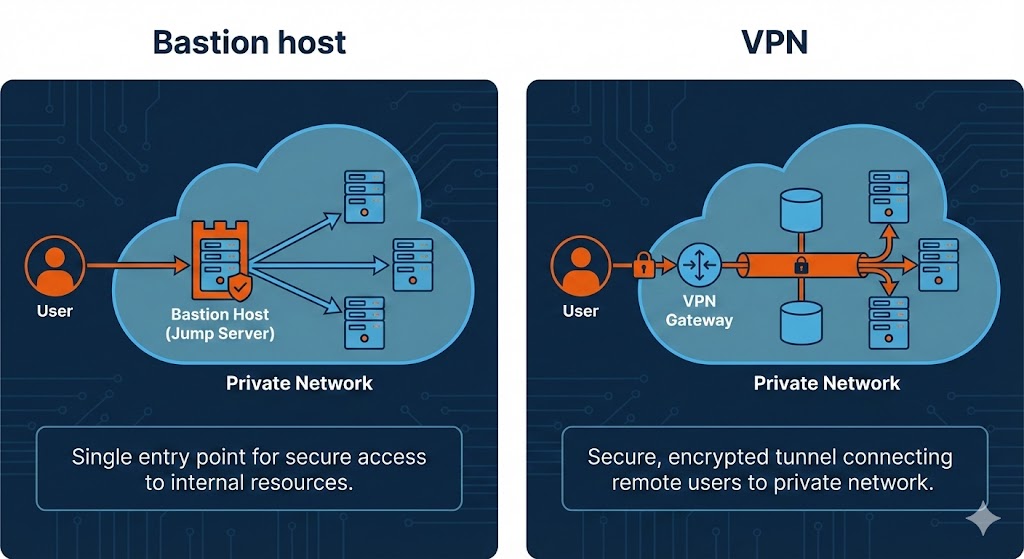
When securing access to internal servers and services, organizations typically face a critical decision: should they use a bastion host, a VPN (Virtual Private Network), or both? Each approach offers distinct advantages and addresses different security requirements.
In this article, I’ll explore the technical differences between bastion hosts and VPN solutions, analyze their respective strengths and weaknesses, and provide guidance on when to use each approach or combine them for enhanced security.
Quick Recap: What is a Bastion Host?
A bastion host (or jump box) is a hardened server that sits at the network perimeter, acting as a single, controlled access point to internal resources. Users connect to the bastion host first, then “jump” from there to access internal servers.
Key characteristics:
- Single-purpose security gateway
- Minimal software footprint
- Exposed to the internet
- All access logged and audited
- Users connect via SSH or RDP
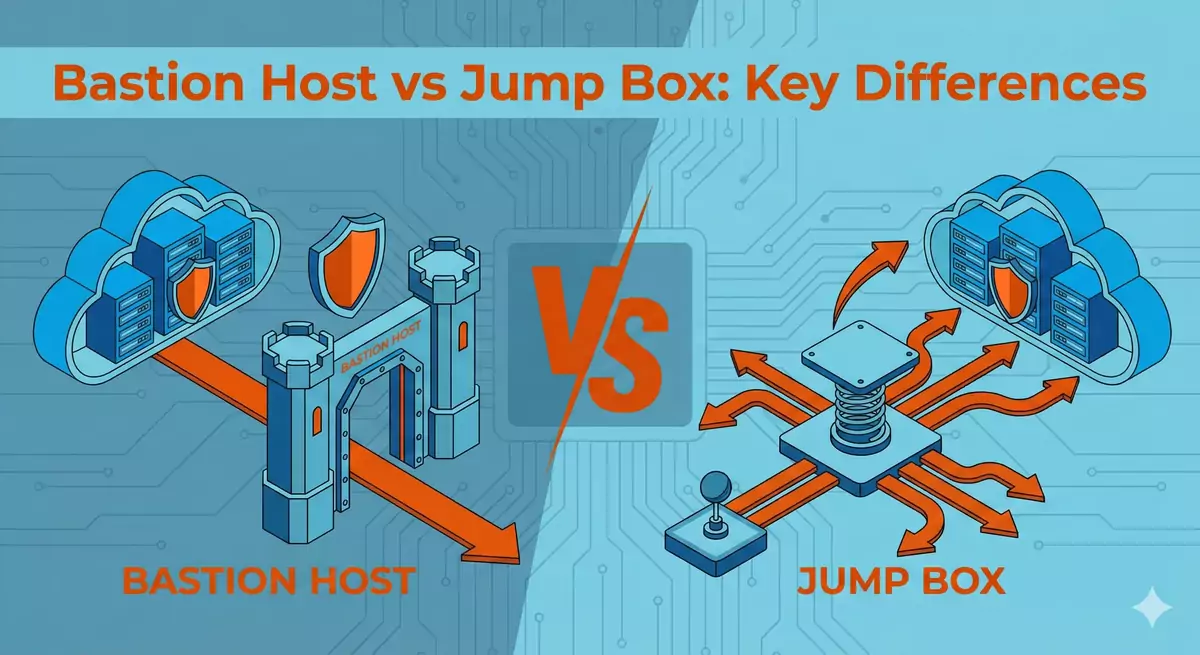
For a deeper understanding of bastion hosts, see my previous article on Bastion Host vs Jump Box differences.
What is a VPN?
A VPN (Virtual Private Network) creates an encrypted tunnel between a user’s device and the internal network, effectively extending the private network to the remote user. Once connected, the user’s device becomes part of the internal network and can access resources as if physically present on-site.
VPN Types
Site-to-Site VPN: Connects entire networks together (e.g., branch offices to headquarters).
Remote Access VPN: Connects individual users to the corporate network from remote locations.
SSL/TLS VPN: Browser-based VPN access without requiring dedicated client software.
IPsec VPN: Network-level VPN using Internet Protocol Security for authentication and encryption.
Key VPN Characteristics
Network-level access: Users gain access to the entire network segment, not just individual servers.
Encrypted tunnel: All traffic between the user and the network is encrypted.
Client software required: Most VPN solutions require installing client software on user devices (except for SSL VPNs).
Transparent connectivity: Once connected, users access internal resources using their private IP addresses.
Protocols and standards: Built on established protocols like IPsec, OpenVPN, WireGuard, or SSL/TLS.
Bastion Host vs VPN: Key Differences
Understanding the fundamental differences helps in making informed architectural decisions:
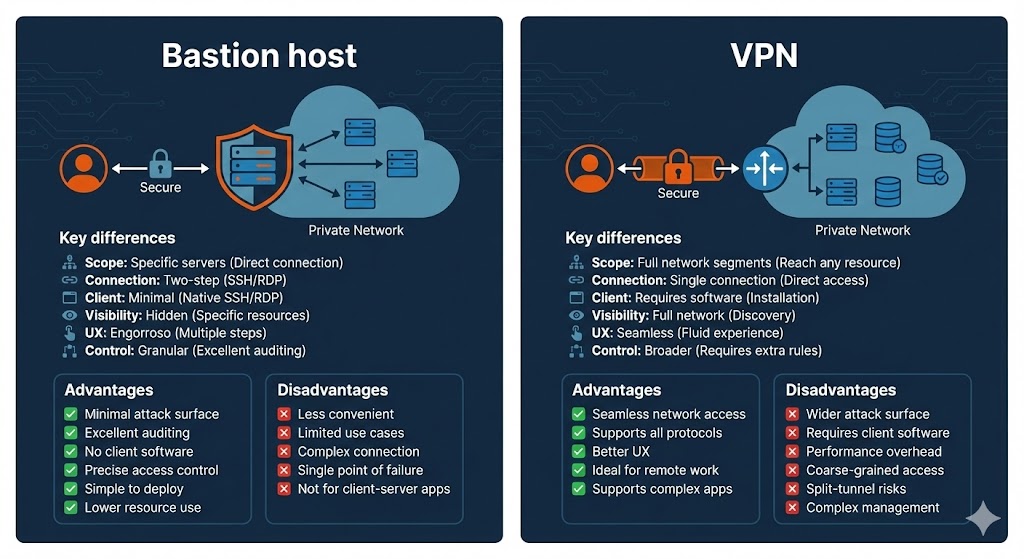
1. Access Scope
Bastion Host: Provides access to specific servers or services. Each connection is explicit and targeted.
VPN: Grants access to entire network segments. Users can reach any resource within the connected network.
2. Connection Method
Bastion Host: Two-step connection process (connect to bastion, then to target server). Requires maintaining SSH/RDP sessions.
VPN: Single connection establishes access to all allowed resources. Subsequent connections are direct to internal servers.
3. Client Requirements
Bastion Host: Minimal client requirements. Only needs SSH or RDP client, typically built into operating systems.
VPN: Requires VPN client software installation and configuration (except SSL VPNs). May require administrative rights for installation.
4. Network Visibility
Bastion Host: Internal network remains invisible to users. They only see the resources they explicitly connect to.
VPN: Users gain visibility into the entire network segment. Can discover services via network scanning (if allowed).
5. User Experience
Bastion Host: More cumbersome for frequent access. Requires multiple connection steps and credential management.
VPN: More seamless experience. Once connected, access internal resources like local network services.
6. Granular Control
Bastion Host: Excellent granular control. Can restrict access to specific servers and audit every connection.
VPN: Broader access model. Granular control requires additional firewall rules and network segmentation.
Advantages and Disadvantages
Bastion Host Advantages
✅ Minimal attack surface: Only SSH/RDP ports exposed, highly hardened system.
✅ Excellent audit trail: Every connection logged with full session details.
✅ No client software: Works with native OS tools (SSH, RDP).
✅ Precise access control: Users only access specific authorized servers.
✅ Simpler to implement: Single server to deploy and maintain.
✅ Lower resource usage: Minimal overhead compared to full VPN tunnels.
Bastion Host Disadvantages
❌ Less convenient: Multiple connection steps for each server access.
❌ Limited use cases: Primarily useful for administrative access, not general network access.
❌ Connection complexity: Managing keys, agent forwarding, and multiple sessions can be challenging.
❌ Single point of failure: If the bastion host goes down, all access is lost (unless redundant).
❌ Not suitable for client-server applications: Applications expecting direct network connectivity won’t work well.
VPN Advantages
✅ Seamless network access: Once connected, users access internal resources directly.
✅ Supports all protocols: Works with any application or protocol, not just SSH/RDP.
✅ Better user experience: More intuitive for end users accustomed to normal network access.
✅ Ideal for remote work: Employees can work as if in the office.
✅ Supports complex applications: Database clients, file shares, internal web apps all work transparently.
VPN Disadvantages
❌ Broader attack surface: More complex infrastructure with potential vulnerabilities.
❌ Requires client software: Users must install and maintain VPN clients (except SSL VPN).
❌ Performance overhead: Encryption/decryption adds latency and reduces throughput.
❌ Coarse-grained access: Without additional segmentation, users gain access to entire network segments.
❌ Split-tunnel risks: If enabled, can expose internal resources to compromised user devices.
❌ More complex to manage: Certificate management, client distribution, compatibility issues.
When to Use a Bastion Host
Bastion hosts are ideal for:
Administrative server access: System administrators needing SSH/RDP access to manage infrastructure.
Developer environments: Developers accessing cloud instances for deployment and debugging.
Minimal access requirements: Small teams with limited servers to access.
Compliance and auditing: Organizations requiring detailed session logging and playback.
Third-party access: Granting temporary access to contractors or vendors for specific servers.
Cloud native architectures: Accessing EC2 instances in private subnets without exposing them publicly.
Cost-sensitive deployments: Lower infrastructure and licensing costs compared to enterprise VPN solutions.
Related Project
Explore a real implementation I have deployed multiple times for various clients in production: bastion host with 2FA authentication, role-based access control, encrypted SSH tunnels for internal services, complete session auditing, and automated user management in AWS.
View Project: AWS Infrastructure Security with Advanced Bastion HostWhen to Use a VPN
VPN solutions excel when:
Broad network access needed: Users require access to multiple services and applications across the network.
Remote workforce: Enabling employees to work remotely with full access to internal resources.
Complex applications: Supporting client-server applications that require direct network connectivity.
File sharing and collaboration: Accessing file servers, shared drives, and collaboration platforms.
Legacy applications: Applications that don’t support modern authentication or require specific network configurations.
Multiple protocols and services: Users need access to databases, web applications, email servers, and more.
Site-to-site connectivity: Connecting branch offices or partner networks.
When to Combine Both: VPN on Bastion Host
The most secure architectures often combine both approaches, offering VPN services from a hardened bastion host. This provides defense-in-depth:
Architecture Benefits
Layered security: VPN provides network encryption, while the bastion host adds access control and auditing.
Single entry point: Consolidates remote access through one hardened system.
Reduced complexity: One system to secure, monitor, and maintain for remote access.
Flexible access: Offer both VPN (for broad access) and direct SSH/RDP (for administrative access).
Cost effective: Single infrastructure serving multiple access patterns.
Implementation Patterns
Pattern 1: VPN Server on Bastion
Deploy OpenVPN, WireGuard, or similar VPN server on the bastion host:
# Example: Installing WireGuard on bastion host
apt-get update
apt-get install wireguard

# Generate server keys
wg genkey | tee /etc/wireguard/privatekey | wg pubkey > /etc/wireguard/publickey

# Configure WireGuard interface
cat > /etc/wireguard/wg0.conf << EOF
[Interface]
PrivateKey = $(cat /etc/wireguard/privatekey)
Address = 10.0.0.1/24
ListenPort = 51820

[Peer]
# Client configuration
PublicKey = CLIENT_PUBLIC_KEY
AllowedIPs = 10.0.0.2/32
EOF

# Enable and start WireGuard
systemctl enable wg-quick@wg0
systemctl start wg-quick@wg0
Pattern 2: SSL VPN on Bastion
For browser-based access without client software:
OpenVPN Access Server: Commercial solution with web-based client.
Pritunl: Open-source VPN server with modern web UI.
AWS Client VPN: Managed VPN service (can route through bastion for additional control).
Pattern 3: IPsec VPN on Bastion
For site-to-site or standards-compliant remote access:
# Example: strongSwan IPsec VPN configuration
apt-get install strongswan strongswan-pki

# Configure IPsec
cat > /etc/ipsec.conf << EOF
config setup
    charondebug="ike 2, knl 2, cfg 2, net 2"
    uniqueids=never

conn roadwarrior
    auto=add
    type=tunnel
    keyexchange=ikev2
    fragmentation=yes
    forceencaps=yes
    ike=aes256-sha256-modp2048!
    esp=aes256-sha256!
    dpdaction=clear
    dpddelay=300s
    rekey=no
    left=%any
    leftid=@vpn.example.com
    leftcert=server.crt
    leftsendcert=always
    leftsubnet=0.0.0.0/0
    right=%any
    rightid=%any
    rightauth=eap-mschapv2
    eap_identity=%identity
    rightdns=8.8.8.8,8.8.4.4
    rightsourceip=10.0.0.0/24
EOF
Best Practices for Combined Deployment
Separate VPN and management access: Use different ports and credentials for VPN and direct bastion access.
Network segmentation: VPN users should only access specific network segments, not everything.
Strong authentication: Implement certificate-based authentication for VPN, MFA for bastion host.
Traffic inspection: Monitor and log VPN traffic for suspicious activity.
Split responsibilities: Different teams manage VPN access and server administration.
Regular audits: Review VPN user access and bastion host logs regularly.
Cloud Provider Solutions
AWS
AWS Client VPN: Managed VPN service that can be configured to route through a bastion host for additional control.
AWS Systems Manager Session Manager: Modern alternative that eliminates the need for both bastion hosts and VPNs for many use cases.
Site-to-Site VPN: For connecting on-premise networks to AWS VPC.
GCP
Cloud VPN: Secure connection between on-premise networks and GCP VPC.
Identity-Aware Proxy (IAP): Eliminates need for bastion hosts or VPN for many access scenarios.
Cloud Interconnect: Dedicated physical connection for hybrid cloud architectures.
Azure
Azure VPN Gateway: Managed VPN service for site-to-site and point-to-site connectivity.
Azure Bastion: Fully managed bastion host service that eliminates need to expose RDP/SSH ports.
ExpressRoute: Private connection between on-premise infrastructure and Azure.
Security Best Practices
Regardless of which approach you choose:
Authentication
Multi-factor authentication (MFA): Mandatory for both bastion host and VPN access.
Certificate-based authentication: Prefer certificates over passwords where possible.
Short-lived credentials: Issue temporary access tokens that expire automatically.
Network Security
Least privilege access: Grant users minimum necessary access to perform their tasks.
Network segmentation: Isolate sensitive resources even within the internal network.
IP whitelisting: Restrict access to known IP addresses when feasible.
Monitoring and Auditing
Centralized logging: Forward all logs to a secure log management system.
Anomaly detection: Implement alerts for unusual access patterns.
Regular access reviews: Audit who has access and revoke unnecessary permissions.
Session recording: Consider recording sessions for security and compliance.
Maintenance
Regular updates: Keep systems patched and up-to-date.
Security scanning: Regularly scan for vulnerabilities.
Disaster recovery: Implement high availability and backup access methods.
Documentation: Maintain clear documentation for incident response.
Conclusion
The choice between bastion hosts and VPN isn’t binary—each serves different use cases and security requirements:
Use a bastion host when: You need simple, auditable administrative access to specific servers with minimal infrastructure.
Use a VPN when: You need broad network access for applications and services, or when enabling remote work for distributed teams.
Combine both when: You want defense-in-depth security with flexible access patterns for different use cases.
Modern cloud environments offer managed alternatives (AWS Systems Manager Session Manager, GCP Identity-Aware Proxy) that can eliminate the need for traditional bastion hosts or VPNs in many scenarios. However, understanding these fundamental access patterns remains crucial for designing secure network architectures.
The best approach depends on your specific requirements: team size, compliance needs, budget constraints, application requirements, and security posture. Many organizations successfully use a hybrid approach, offering VPN for general access and bastion hosts for administrative access, providing both convenience and security.

Comments
Submit comment