Daniel López Azaña

Theme

Social Media

Blog

GNU/Linux, Open Source, Cloud Computing, DevOps and more...

Script to automatically change all gp2 volumes to gp3 with aws-cli

Script to automatically change all gp2 volumes to gp3 with aws-cli

Last December Amazon announced its new EBS gp3 volumes, which offer better performance and a cost saving of 20% compared to those that have been used until now (gp2). Well, after successfully testing these new volumes with multiple clients, I can do nothing but recommend their use , because they are all advantages and in these 2 and a half months that have passed since the announcement I have not noticed any problems or side effects.

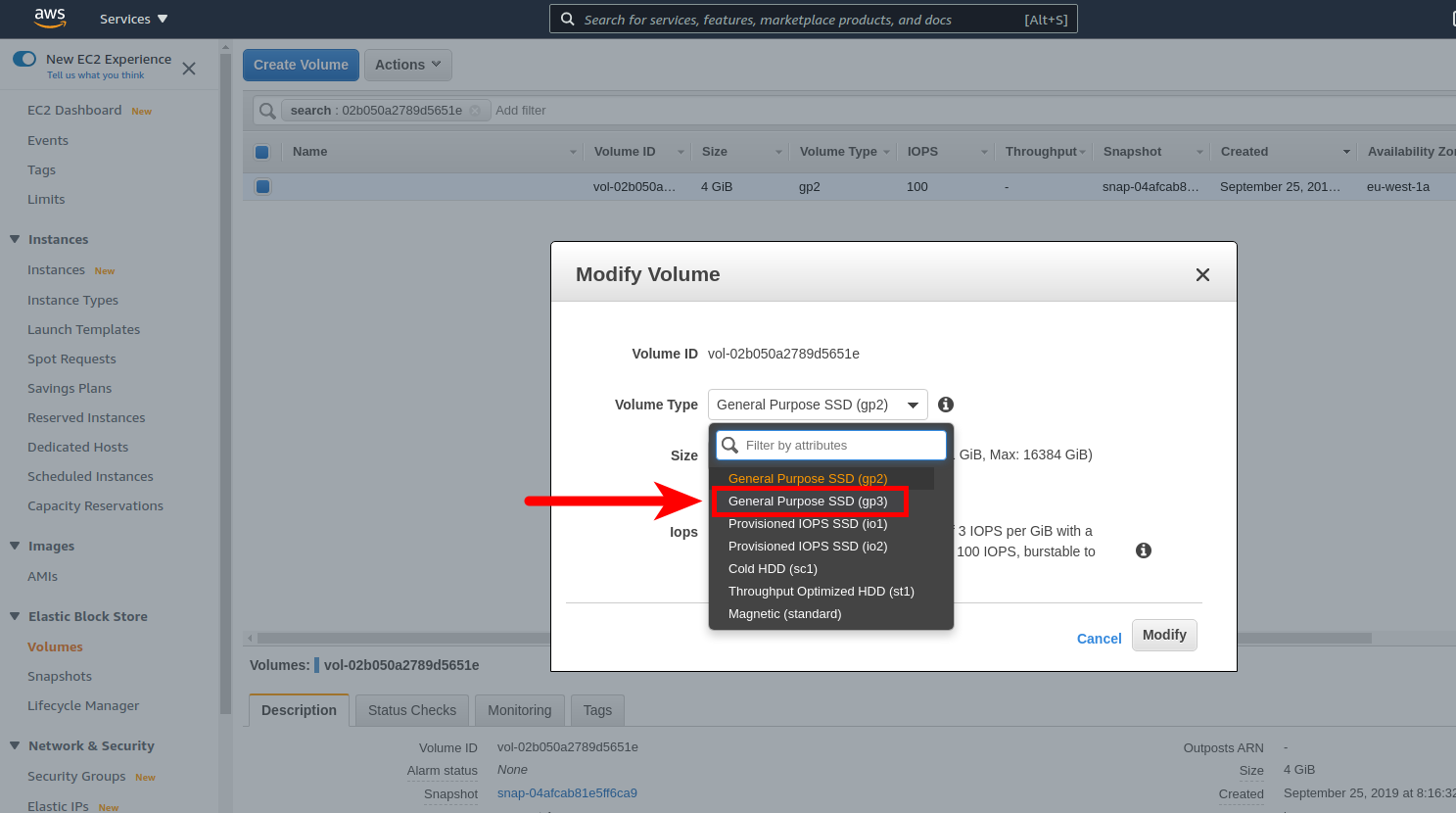
Making the change is extremely simple, just select a volume from the AWS console and change its type like this:
However, doing it this way when you have lots of clients that may have hundreds or thousands of these volumes , makes this a tedious, time-consuming and error-prone task, as we may inadvertently select a volume that was not gp2, or change it to another type that is not the expected gp3. And once we have made a mistake, the volume remains in the «modifying» state for quite some time and then in the «optimizing» state for even longer, which will require us to move on to something else and then remember to review all the volumes and correct those where we made a mistake.

To avoid these problems when we have a large number of EBS volumes, I wrote a very simple bash script that completely automates the task, saving us a lot of time and tedium and protecting us from making mistakes:

#! /bin/bash

region='us-east-1'

# Find all gp2 volumes within the given region
volume_ids=$(/usr/bin/aws ec2 describe-volumes --region "${region}" --filters Name=volume-type,Values=gp2 | jq -r '.Volumes[].VolumeId')

# Iterate all gp2 volumes and change its type to gp3
for volume_id in ${volume_ids};do
    result=$(/usr/bin/aws ec2 modify-volume --region "${region}" --volume-type=gp3 --volume-id "${volume_id}" | jq '.VolumeModification.ModificationState' | sed 's/"//g')
    if [ $? -eq 0 ] && [ "${result}" == "modifying" ];then
        echo "OK: volume ${volume_id} changed to state 'modifying'"
    else
        echo "ERROR: couldn't change volume ${volume_id} type to gp3!"
    fi
done

The only requirement is to have the jq tool to better handle the JSON returned by the aws command. It can be installed by simply running apt install jq or yum install jq , as it is included in the repositories of all Linux distributions.

Finally, it should be noted that this script will cause the default values for the IOPS (3000) and Throughput (125 MB/s) parameters to be set, but as these far exceed the performance offered by the gp2 volumes, this should not be a problem.

Needless to say, this same script can be used to massively change EBS volumes of other types, such as io1, io2, sc1, st1, etc.

Hope it helps you save time and headaches!

Daniel López Azaña

About the author

Daniel López Azaña

Tech entrepreneur and cloud architect with over 20 years of experience transforming infrastructures and automating processes.

Specialist in AI/LLM integration, Rust and Python development, and AWS & GCP architecture. Restless mind, idea generator, and passionate about technological innovation and AI.

Related articles

AWS security groups

How to automatically update all your AWS EC2 security groups when your dynamic IP changes

One of the biggest annoyances when working with AWS and your Internet connection has a dynamic IP is that when it changes, you immediately stop accessing to all servers and services protected by an EC2 security group whose rules only allow traffic to certain specific IP’s instead of allowing open connections to everyone (0.0.0.0.0/0).Certainly the simplest thing to do is always allowing traffic on a given port to everyone, so that even if you have a dynamic IP on your Internet connection you will always be able to continue accessing even if it changes. But opening traffic on a port to everyone is not the right way to proceed from a security point of view, because then any attacker will be able to access that port without restrictions, and that is not what you want.

January 12, 2021
terraform-and-route53-logos

How to quickly import all records from a Route53 DNS zone into Terraform

The terraform import command allows you to import into HashiCorp Terraform resources that already existed previously in the provider we are working with, in this case AWS. However, it only allows you to import those records one by one, with one run of terraform import at a time. This, apart from being extremely tedious, in some situations becomes impractical. This is the case for the records of a Route53 DNS zone. The task can become unmanageable if we have multiple DNS zones, each one with tens or hundreds of records. In this article I offer you a bash script that will allow you to import in Terraform all the records of a Route53 DNS zone in a matter of seconds or a few minutes.

February 8, 2022
Logo AWS EBS

How to enlarge the size of an EBS volume in AWS and extend an ext4 partition

When we completely fill up an ext4 filesystem mounted on a partition hosted in an EBS volume of Amazon Web Services and we can not do anything to free space because we do not want to lose any of the stored data, the only solution is to grow up the volume and extend the associated partition up to 100% of its capacity to obtain free space again.We start in our example with a 50 GB volume full to 100%. We want to extend it to double the size, 100 GB:

May 23, 2017

Comments

Zachary Armstrong March 27, 2021
You should remove the ! from the error output message, as it will crap out in bash.
Daniel March 27, 2021
The ! is not interpreted by bash as it's part of a string between quotes. I don't see any problem by using it, but feel free to remove it if it's causing any problem to you!
Zachary Armstrong March 31, 2021
That's not true. If it's enclosed in single quotes, you can use the !, but if you use double quotes, as you did in the scrip, you have to slash escape it \\!. If it's working for you with double quotes, that means you have history expansion disabled, as ! is the default history expansion character. History expansion is on by default, so you (or someone else) must have purposely disabled it, or you're using some odd flavor of bash/csh that hs it disabled by default. More info here: https://www.gnu.org/savannah-checkouts/gnu/bash/manual/bash.html#History-Interaction Also, the background of the reply window I'm typing in is the dar gray of the site and the font color is a dark gray, too, making it near impossible to write this out. I ended up writing this response in a text editor then pasting it. I'll email you a screenshot.
jack September 7, 2022
How do we run this script ? can you please provide steps for that ?
Daniel September 11, 2022
You save it to a file, ie change-gp2-to-gp3.sh, then run the command chmod u+x change-gp2-to-gp3.sh to give it execution permission, and then run ./change-gp2-to-gp3.sh from the same directory the script is stored to execute it.
Dennis Ogunfiditimi July 6, 2021
Hi Daniel - How can I add your script to a Lambda function and Run a monthly event to check all the volume in my account and auto modify volume types from a gp2 - gp3 on a Monthly basis? Thank you
Rook Bravo October 31, 2021
Create a trigger in cloudwatch events or eventbridge and set a schedule or a cron expression to trigger this lambda function.
Victor Chavez July 8, 2021
no need for jq. use: --query 'Volumes[].VolumeId'
Rook Bravo October 27, 2021
I took the liberty of enhancing this script a little further to Migrate gp2 to gp3 volumes of specific ec2 instances by tags region="us-east-1" for ec2_instance_id in $(aws ec2 describe-instances --region $region --filter "Name=tag:env, Values=dev" | jq -r '.Reservations[].Instances[].InstanceId') do for volume_id in $(aws ec2 describe-instances --region $region --instance-id $ec2_instance_id | jq -r '.Reservations[].Instances[].BlockDeviceMappings[].Ebs.VolumeId') do volume_type=$(aws ec2 describe-volumes --region $region --volume-id $volume_id | jq -r '.Volumes[].VolumeType') if [ $volume_type == 'gp2' ]; then echo "Volume id: $volume_id is of type $volume_type and belongs to Instance id: $ec2_instance_id" result=$(aws ec2 modify-volume --region ${region} --volume-type=gp3 --volume-id ${volume_id} | jq '.VolumeModification.ModificationState' | sed 's/"//g') if [ $? -eq 0 ] && [ $result == "modifying" ]; then echo "OK: volume ${volume_id} changed to state modifying" else echo "ERROR: could not change volume ${volume_id} type to gp3" fi fi done done
Daniel November 1, 2021
Thanks!
Lokesh March 25, 2022
getting error for thisjq: error: syntax error, unexpected INVALID_CHARACTER, expecting $end (Unix shell quoting issues?) at , line 1: ‘.Reservations[].Instances[].InstanceId’ jq: 1 compile error 'ascii' codec can't decode byte 0xe2 in position 0: ordinal not in range(128) script .
Ratul Dutta February 2, 2022
Hi Daniel.. your script helped a lot today . need to convert more than 200 disks from gp2 to gp3.. done easily using your script... Thanks a lot.. :)
Daniel February 2, 2022
Great! Good to know :-)
Rocket June 3, 2022
Hi Daniel, this script LGTM OMG! your script saved me from a lot of gp2 volumes hell. this script works good without any problem.
Chandler August 11, 2022
Hi Daniel! Thanks for the awesome script, works like a charm :)

Submit comment