Organizations operating infrastructure on AWS face a critical security challenge: protecting access to sensitive internal resources such as databases, application servers and file systems, without exposing them directly to the internet or compromising the productivity of distributed teams requiring legitimate administrative access from remote locations.

Multiple organizations across different industries needed to transform their AWS network security model, eliminating direct exposure of internal servers and establishing granular access controls with complete traceability of administrative activity. As a cloud architect specialized in security, I have designed and implemented this bastion host-based security architecture with multi-factor authentication for various clients, providing role-based access control, encrypted SSH tunnels for internal services and a complete session auditing system for regulatory compliance.
The Challenge: Secure Access to Internal Infrastructure Without Public Exposure
Traditional AWS architectures often expose EC2 instances with public IPs or configure complex corporate VPNs. Both approaches present significant disadvantages:
Problems identified in the previous model:
Solution requirements:
- Single secure entry point for administrative access to private VPC.
- Mandatory multi-factor authentication for all users.
- Role-based access control with granular permissions per user group.
- Encrypted SSH tunnels for access to internal services (PostgreSQL, MySQL, RDP, SFTP).
- Complete session auditing with replay capability for compliance.
- Automated user management through centralized scripts.
- Chrooted SFTP for external users requiring file transfer.
The solution: completely redesigned AWS security architecture with high-security bastion host, 2FA authentication, role-based access segmentation and comprehensive auditing.
Solution Architecture
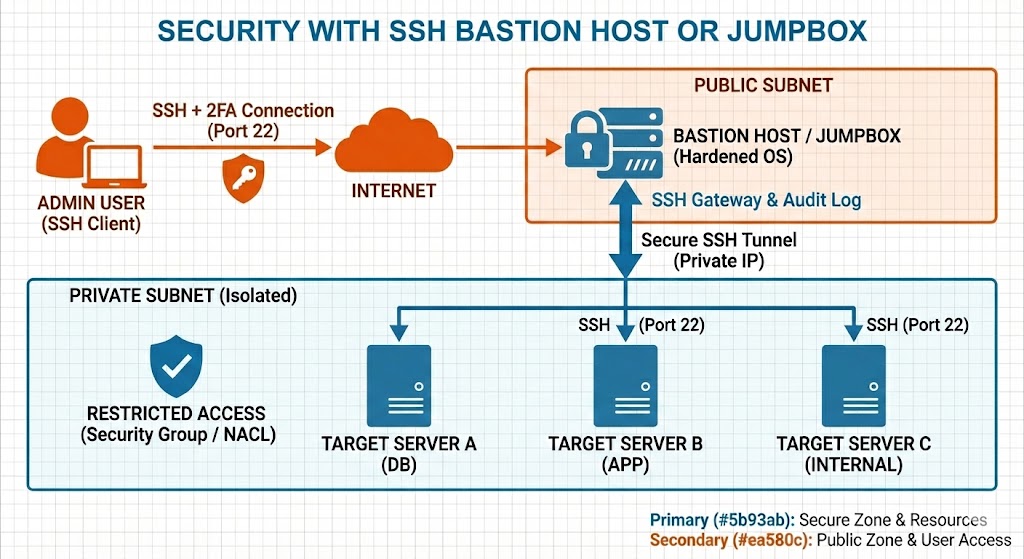
The implemented architecture is a Zero Trust security design for AWS that establishes a single, strongly secured entry point, completely eliminating the need for public IPs on internal servers.
Core Components
| Component | Technology | Purpose |
|---|---|---|
| Bastion Host | Hardened EC2 + OpenSSH | Single SSH entry point to private VPC |
| 2FA Authentication | Google Authenticator + PAM | Mandatory second factor based on TOTP |
| SSH Tunnels | SSH Port Forwarding | Encrypted access to internal services (DB, RDP, SFTP) |
| Access Control | Linux Groups + sshd_config | Granular permissions per user role |
| Session Auditing | sudo + sudoreplay | Recording and replay of administrative sessions |
| User Management | Bash Scripts + database | Automation of provisioning, deprovisioning and permissions |
| DNS | Route53 | Name resolution for bastion host |
| Firewall | Security Groups + iptables | Traffic control at network and host level |
Architecture Diagram
Related Project
Want to understand the difference between a bastion host and a jump box? These terms are often used interchangeably, but there are important technical distinctions. Learn about the architectural differences and when to use each approach in this detailed comparison.
Read: Bastion Host vs Jump Box - Key DifferencesSolution 1: Bastion Host with Two-Factor Authentication
Bastion Host Implementation
The bastion host is an EC2 instance specifically configured as the single SSH entry point to the VPC, located in a public subnet with elastic IP and complete operating system hardening.
Implemented security configuration:
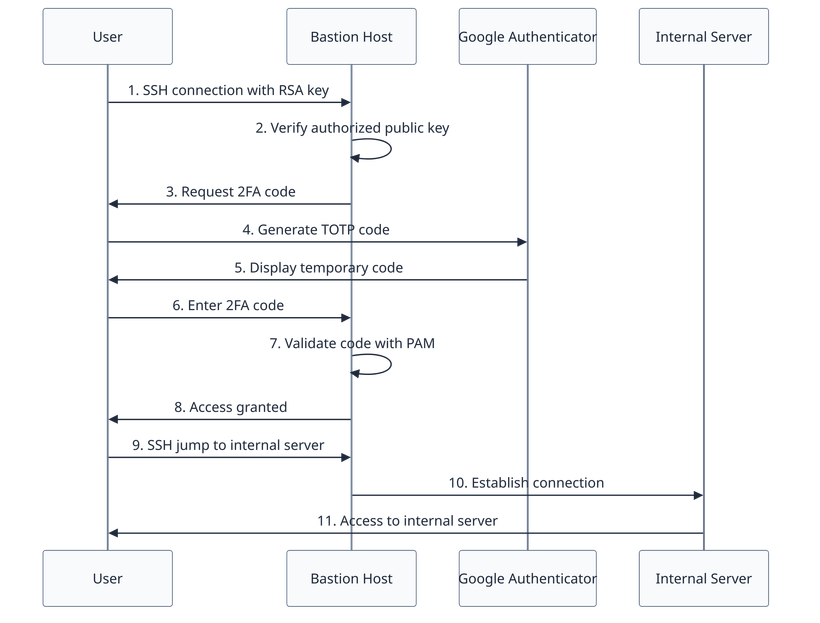
Google Authenticator Integration with PAM
Two-factor authentication was implemented via PAM (Pluggable Authentication Modules) integrated with Google Authenticator, requiring three authentication factors:
- Something you have: RSA private key (stored on user’s device)
- Something you know: RSA key passphrase (optional but recommended)
- Something you possess: mobile device with Google Authenticator generating TOTP
Authentication flow:
Role-Based Granular Permissions Configuration
The solution includes a Linux group-based access control system with specific permissions defined in sshd_config using Match Group directives:
| Group | Permissions | Restrictions | Use Cases |
|---|---|---|---|
| admin-group | Interactive shell Unrestricted SSH jump Unlimited port forwarding No auditing | None | System administrators with full privileges |
| developer-group | Interactive shell SSH jump to specific servers Restricted port forwarding Full auditing | Only RDP and PostgreSQL tunnels | Developers requiring access to databases and dev servers |
| external-rw | No shell by default Very restricted port forwarding Full auditing | Only specific authorized services PermitTTY no | External users with read/write access to specific services |
| external-ro | No shell Read-only port forwarding Full auditing | Database read-only PermitTTY no | External users with read-only access |
| sftp-only | No shell No port forwarding Chrooted SFTP Full auditing | ChrootDirectory configured ForceCommand internal-sftp | Users only requiring file transfer |
Example sshd_config configuration:
# admin-group: no restrictions
Match Group admin-group
    AllowTcpForwarding yes
    PermitOpen any
    PermitTTY yes

# developer-group: controlled access with auditing
Match Group developer-group
    AllowTcpForwarding yes
    PermitOpen internal-db-1:5432 internal-db-2:5432 internal-rdp:3389
    PermitTTY yes
    ForceCommand /usr/local/bin/audit-wrapper.sh

# external-rw: very restricted
Match Group external-rw
    AllowTcpForwarding yes
    PermitOpen service-api:8080
    PermitTTY no
    ForceCommand /usr/local/bin/audit-wrapper.sh

# sftp-only: chrooted SFTP
Match Group sftp-only
    ChrootDirectory /sftp-home/%u
    ForceCommand internal-sftp
    AllowTcpForwarding no
    PermitTunnel no
    X11Forwarding no
Solution 2: SSH Tunnels for Internal Services Access
Encrypted SSH Tunnels
SSH tunnels enable secure access to internal services without publicly exposing ports, establishing an encrypted channel between the local client and remote service through the bastion host.
Services accessible via tunnels:
SSH Tunnel Examples
Local tunnel for PostgreSQL:
# Tunnel from localhost:5432 to internal database
ssh -N -L 5432:internal-db.vpc.internal:5432 username@bastion-host

# User connects locally
psql -h localhost -p 5432 -U dbuser -d production
Tunnel for Windows RDP:
# Tunnel from localhost:3389 to internal Windows server
ssh -N -L 3389:windows-server.vpc.internal:3389 username@bastion-host

# RDP client connects to localhost:3389
Tunnel for SFTP to internal server:
# Tunnel from localhost:2022 to internal SFTP server
ssh -N -L 2022:internal-sftp.vpc.internal:22 username@bastion-host

# SFTP client connects locally
sftp -P 2022 deployuser@localhost
Automated User Documentation
The system includes automatic documentation generation customized for each user, creating README files in their home directories with:
- Specific SSH tunnel commands for their authorized services
- Connection examples with GUI clients (DBeaver, pgAdmin, Remmina)
- Accessible internal hosts based on their permission group
- 2FA setup instructions
Solution 3: Complete Administrative Session Auditing
Session Recording System
Session auditing was implemented via sudo logging integrated with sudoreplay, enabling:
- Complete session recording for all groups except admin-group
- Session replay as ASCII terminal video
- Command search executed by user and date
- Regulatory compliance (GDPR, SOC 2, ISO 27001)
Sudoers configuration for auditing:
# Configuration in /etc/sudoers.d/audit
Defaults log_output
Defaults!/usr/bin/sudoreplay !log_output
Defaults!/sbin/reboot !log_output

# Exceptions for admin-group (no auditing)
%admin-group ALL=(ALL) NOPASSWD: ALL

# Auditing for developer-group
%developer-group ALL=(ALL) ALL

# Auditing for external users
%external-rw ALL=(LIMITED) ALL
User session replay:
# List sessions for specific user
sudo sudoreplay -l user jsmith

# Replay specific session
sudo sudoreplay -d /var/log/sudo-io/00/00/01

# Search for specific command in all sessions
sudo sudoreplay -l command mysql
Log Centralization in CloudWatch
Audit logs are automatically sent to CloudWatch Logs for:
- Long-term retention (compliance)
- Centralized activity analysis
- Real-time alerts on suspicious patterns
- Automatic backup outside bastion host
Solution 4: User Management Automation
Centralized Administrative Scripts
The solution includes a set of Bash scripts that fully automate user management, eliminating error-prone manual tasks:
| Script | Function | Benefit |
|---|---|---|
create-new-user.sh | Creates user, assigns group, generates 2FA QR | Automated provisioning with complete configuration |
delete-user.sh | Removes user and cleans configuration | Safe deprovisioning without residuals |
grant-user-authorized-hosts.sh | Grants access to specific internal hosts | Granular permission control |
revoke-user-authorized-hosts.sh | Revokes access to internal hosts | Immediate revocation on incidents |
update-README-files.sh | Updates user documentation | Always synchronized documentation |
update-skel-files.sh | Updates new user templates | Configuration standardization |
User Database
Scripts operate on a simple flat-file database (users.db) that maintains:
- Active users and assigned groups
- Authorized internal hosts per user
- Creation date and last access
- 2FA status (configured/pending)
Benefits of the automated system:
Solution 5: Chrooted SFTP for External Users
Secure SFTP Implementation
For external users requiring file transfer without shell access, the solution implements chrooted SFTP, completely isolating each user to their home directory.
Chrooted SFTP configuration:
# In /etc/ssh/sshd_config
Match Group sftp-only
    ChrootDirectory /sftp-home/%u
    ForceCommand internal-sftp
    AllowTcpForwarding no
    PermitTunnel no
    X11Forwarding no
    PermitTTY no
Directory structure:
/sftp-home/
  ├── external-user-1/          # Owned by root:root, permissions 755
  │   └── uploads/              # Owned by external-user-1:sftp-only, permissions 770
  │       ├── incoming/
  │       └── outgoing/
  └── external-user-2/
      └── uploads/
Security features:
- Users cannot see content outside their directory
- No shell access (ForceCommand internal-sftp)
- No port forwarding (AllowTcpForwarding no)
- Mandatory 2FA authentication
- Complete transfer logs
Results and Business Impact
Security Improvements
Regulatory Compliance and Auditing
Operational Optimization
Production Track Record
Proven Security Architecture Across Multiple Production Environments
This bastion host security architecture has been successfully deployed multiple times for various clients in production environments, protecting critical infrastructure across different industries and organizational scales.
Security track record: To date, no successful intrusion attempts have been recorded in any of the deployed implementations, demonstrating the effectiveness of the layered security approach combining hardened infrastructure, mandatory 2FA, role-based access control, and comprehensive auditing.
Key Technical Achievements
Lessons Learned
What worked exceptionally well:
- Google Authenticator with PAM: simple and reliable 2FA integration without dependencies on third-party cloud services.
- Group-based access control: complete flexibility via Match Group directives in sshd_config without code modification.
- Sudoreplay for auditing: ability to replay sessions as ASCII video proves invaluable for incident investigation.
- User management automation: investment in automated scripts paid off quickly by reducing errors and operational time.
- Auto-generated documentation: users receive personalized instructions automatically updated, reducing support tickets.
Technical challenges overcome:
- Chrooted SFTP configuration: requires specific permissions in directory structure (root:root for ChrootDirectory) that can be counter-intuitive initially.
- Persistent SSH tunnels: users need to maintain active tunnels, we implemented wrapper scripts to facilitate the experience.
- SSH client compatibility: some legacy SSH clients require encryption configuration adjustments, we documented compatible configurations.
- Voluminous audit logs: implemented automatic rotation and compression of sudoreplay logs to manage disk space.
- Initial 2FA setup: automated QR code generation and secure delivery to users via encrypted PDF.
Related Project
Wondering whether a bastion host or VPN is better for your infrastructure? Each approach has distinct advantages for different scenarios. Learn when to use each one, when to combine both, and how to implement them effectively in this comprehensive comparison.
Read: Bastion Host vs VPN - Choosing the Right Secure Access MethodConclusion
This AWS infrastructure security project with advanced bastion host represents a complete case study on how to implement Zero Trust architectures in cloud environments, eliminating unnecessary public exposure of internal resources while maintaining administrative accessibility for distributed teams. By combining mandatory multi-factor authentication, granular role-based access control, encrypted SSH tunnels and comprehensive session auditing, this robust security solution meets compliance standards without compromising productivity.
The resulting architecture establishes a reproducible security model applicable to any organization operating AWS infrastructure, private VPCs in other clouds or even on-premise datacenters. The system provides defense in depth through multiple overlapping security layers and complete traceability for regulatory compliance.
Key Takeaways for Similar Projects
- Bastion host as single chokepoint: centralizing SSH access at a single point simplifies auditing, monitoring and security policy enforcement.
- 2FA is not optional: multi-factor authentication must be mandatory without exceptions to protect against credential theft.
- Granular access control from day one: implementing differentiated roles and permissions from the start avoids complex refactorings later.
- Auditing as non-negotiable requirement: the ability to replay administrative sessions proves invaluable for incident investigation and compliance.
- Automation to eliminate human errors: manual user and permission management is prone to critical security errors that automation completely eliminates.
Need to secure your AWS infrastructure?
If your organization faces similar challenges:
- Internal servers with public IPs directly exposed to the internet.
- Single-factor authentication without 2FA for administrative access.
- Shared accounts without traceability to individual users.
- Compliance requirements (GDPR, SOC 2, ISO 27001, PCI DSS) without adequate auditing.
- Manual access management prone to errors and slow.
As an AWS cloud architect with 20+ years of security experience, I can help you design and implement Zero Trust architectures that protect your critical resources without compromising your teams’ productivity.
Specialized in hardened bastion hosts, multi-factor authentication, role-based access control and auditing systems for regulatory compliance.
Get in touch →

About the author
Daniel López Azaña
Tech entrepreneur and cloud architect with over 20 years of experience transforming infrastructures and automating processes. Specialist in AI/LLM integration, Rust and Python development, and AWS & GCP architecture. Restless mind, idea generator, and passionate about technological innovation and AI.
Related projects
AWS EC2 Ubuntu Server Security Hardening with Multi-Volume Architecture
Automated security hardening solution for AWS EC2 Ubuntu servers implementing encrypted multi-volume architecture, system-level security controls, SSH hardening, user access management and comprehensive monitoring. Repeatable AMI-based deployment process for multiple production environments.
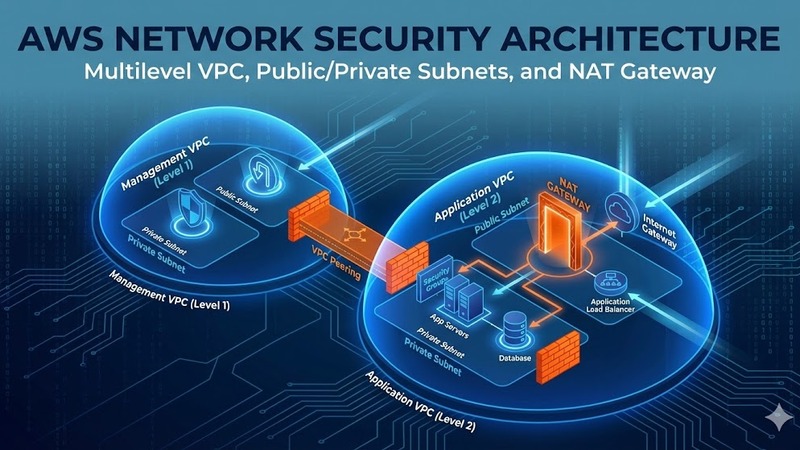
Multilevel network security architecture in AWS with VPC, NAT Gateway and perimeter protection
Design and implementation of enterprise AWS security architecture with multilevel VPC, public and private subnet separation, NAT Gateway for controlled outbound traffic, multi-AZ deployment for high availability, AWS Shield for DDoS protection, AWS WAF for application security and comprehensive backup strategy with AWS Backup.
AWS Security and Infrastructure Consulting for Web Platform
Complete security audit and AWS infrastructure optimization for a web application platform, detecting and resolving critical security vulnerabilities, implementing monitoring systems, and modernizing the technology stack.
Comments
Submit comment